Free for 7 days
Every feature included. No subscription and no card.
- macOS 15 or later
- Apple silicon only: M1 or later
- Disk image (DMG)

Documents to Markdown, for Mac
Drop files. Get Markdown.
StillLane turns PDFs, scans, photos, Word documents, spreadsheets and web pages into clean Markdown. The work happens on your Mac; your files are not uploaded to the cloud.
Every feature included. No subscription and no card.
One payment, no subscription.
Planned price: $9.75
Download and purchase open at launch. No payments are accepted on this website yet.
Word documents, spreadsheets, text and HTML are read directly, without recognition. For scans and images, accuracy depends on the language and quality of the original.
Every conversion runs on the Mac itself. No account is needed.
Files are not sent to a cloud service to be converted or recognized.
A local AI model reads scans and photos on the Mac itself.
StillLane changes the format, not the words: text stays in its original language.
Checking for updates opens the StillLane web page in your browser and passes only the app version — never your documents.
Six documents. Six real StillLane exports. Explore the structure, tables and values in each result.
1 / 6
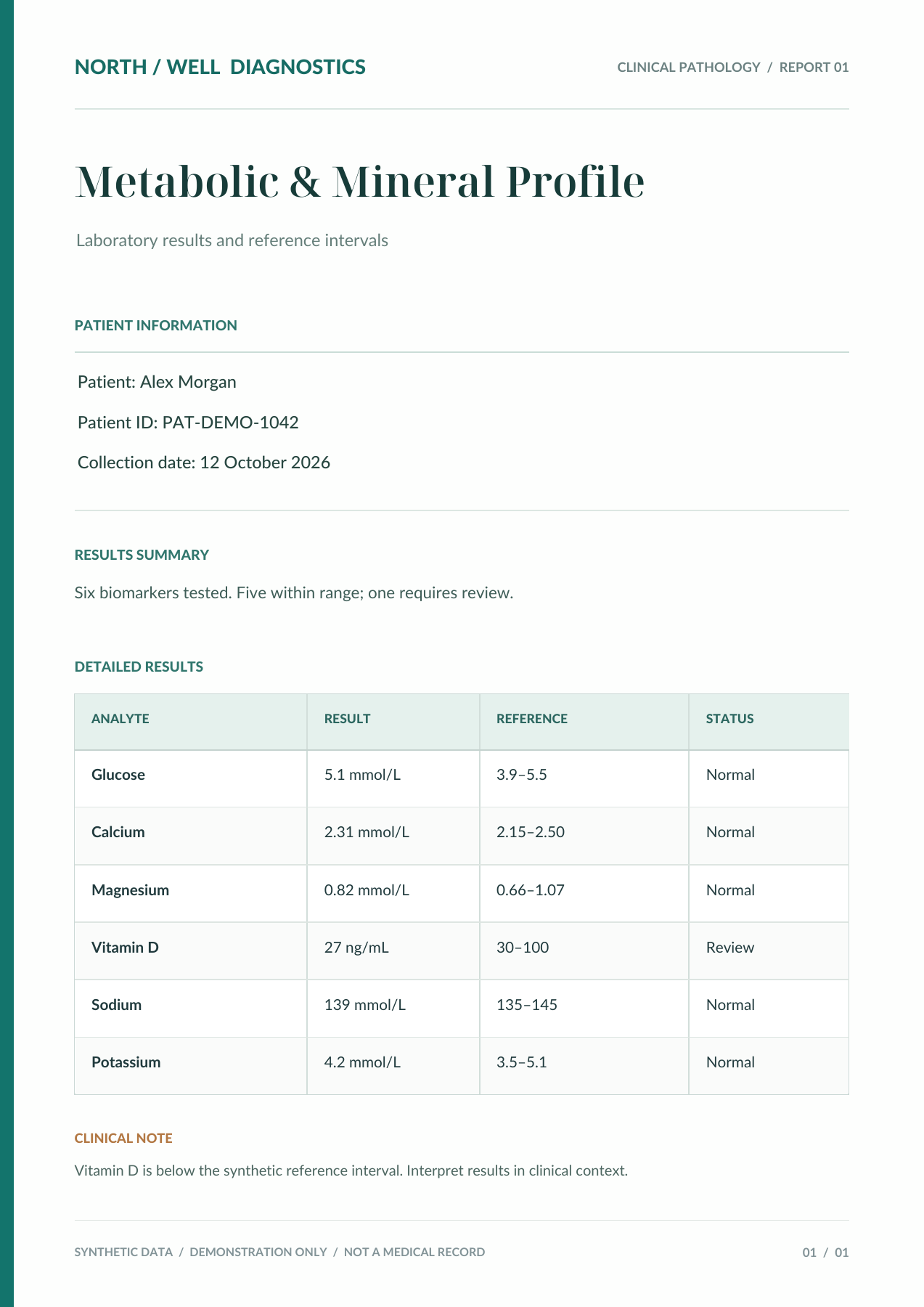
Headings, six biomarkers and their reference intervals become editable text and a table.
CLINICAL PATHOLOGY / REPORT 01
Laboratory results and reference intervals
Patient: Alex Morgan
Patient ID: PAT-DEMO-1042
Collection date: 12 October 2026
Six biomarkers tested. Five within range; one requires review.
| ANALYTE | RESULT | REFERENCE | STATUS |
|---|---|---|---|
| Glucose | 5.1 mmol/L | 3.9–5.5 | Normal |
| Calcium | 2.31 mmol/L | 2.15–2.50 | Normal |
| Magnesium | 0.82 mmol/L | 0.66–1.07 | Normal |
| Vitamin D | 27 ng/mL | 30–100 | Review |
| Sodium | 139 mmol/L | 135–145 | Normal |
| Potassium | 4.2 mmol/L | 3.5–5.1 | Normal |
Vitamin D is below the synthetic reference interval. Interpret results in clinical context.
SYNTHETIC DATA / DEMONSTRATION ONLY / NOT A MEDICAL RECORD
01 / 01
# NORTH / WELL DIAGNOSTICS

CLINICAL PATHOLOGY / REPORT 01

---

## Metabolic & Mineral Profile

Laboratory results and reference intervals

---

### PATIENT INFORMATION

Patient: Alex Morgan
Patient ID: PAT-DEMO-1042
Collection date: 12 October 2026

---

### RESULTS SUMMARY

Six biomarkers tested. Five within range; one requires review.

---

### DETAILED RESULTS

<table>
  <thead>
    <tr>
      <th>ANALYTE</th>
      <th>RESULT</th>
      <th>REFERENCE</th>
      <th>STATUS</th>
    </tr>
  </thead>
  <tbody>
    <tr>
      <td>Glucose</td>
      <td>5.1 mmol/L</td>
      <td>3.9–5.5</td>
      <td>Normal</td>
    </tr>
    <tr>
      <td>Calcium</td>
      <td>2.31 mmol/L</td>
      <td>2.15–2.50</td>
      <td>Normal</td>
    </tr>
    <tr>
      <td>Magnesium</td>
      <td>0.82 mmol/L</td>
      <td>0.66–1.07</td>
      <td>Normal</td>
    </tr>
    <tr>
      <td>Vitamin D</td>
      <td>27 ng/mL</td>
      <td>30–100</td>
      <td>Review</td>
    </tr>
    <tr>
      <td>Sodium</td>
      <td>139 mmol/L</td>
      <td>135–145</td>
      <td>Normal</td>
    </tr>
    <tr>
      <td>Potassium</td>
      <td>4.2 mmol/L</td>
      <td>3.5–5.1</td>
      <td>Normal</td>
    </tr>
  </tbody>
</table>

---

### CLINICAL NOTE

Vitamin D is below the synthetic reference interval. Interpret results in clinical context.

---

SYNTHETIC DATA / DEMONSTRATION ONLY / NOT A MEDICAL RECORD

01 / 01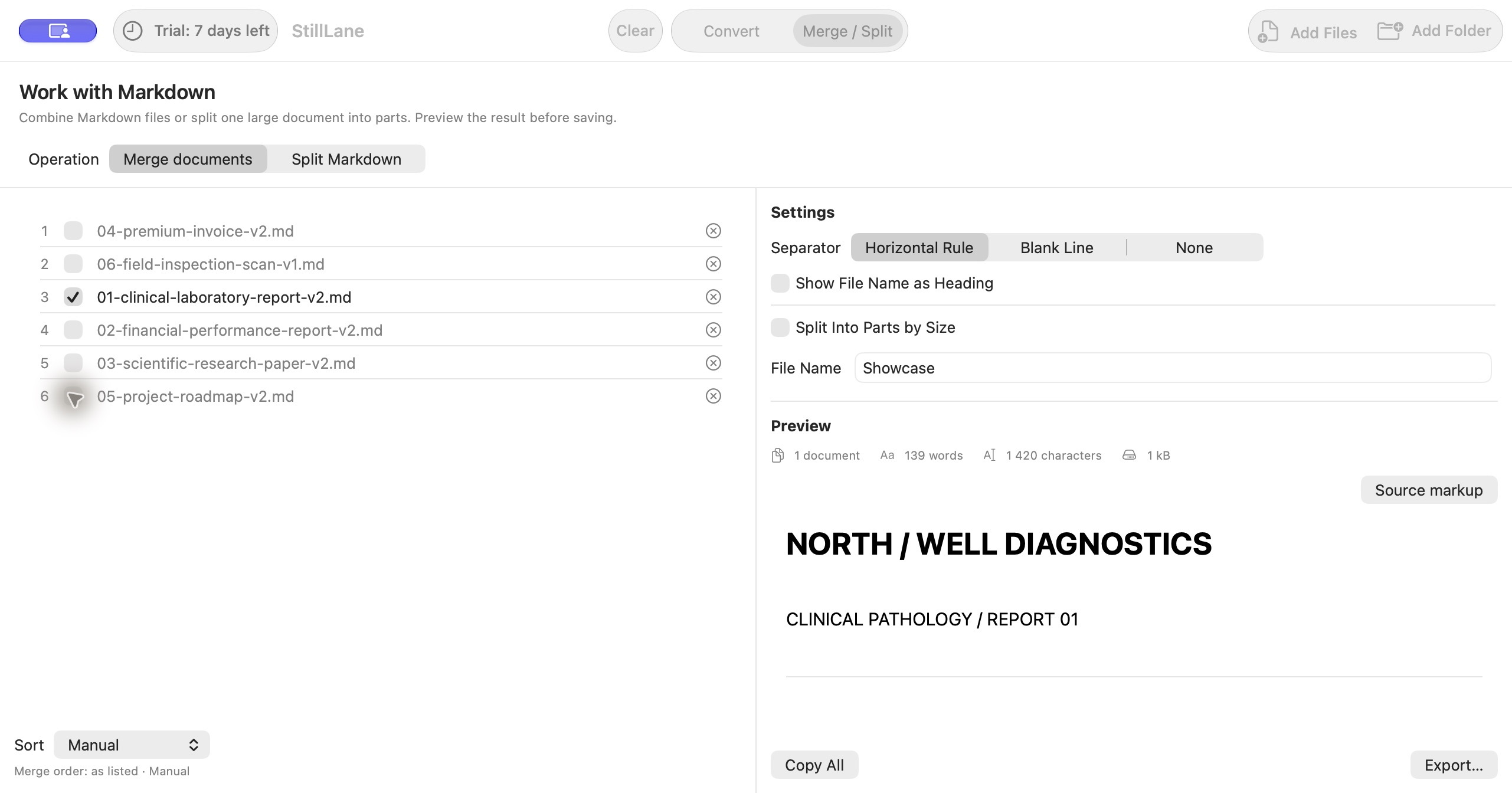
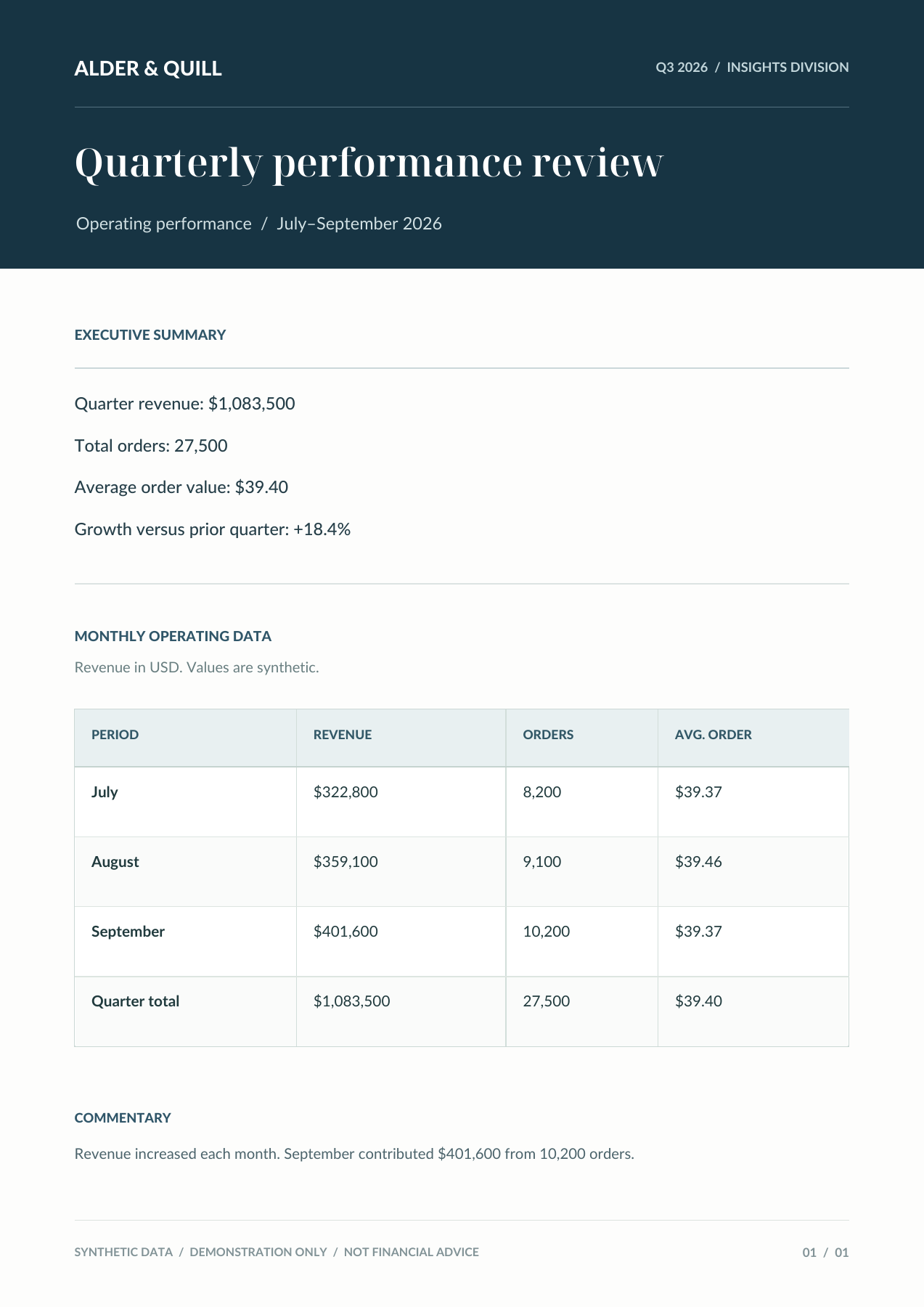
Monthly revenue, orders and quarter totals remain together in a structured report.
ALDER & QUILL
Q3 2026 / INSIGHTS DIVISION
Operating performance / July–September 2026
Quarter revenue: $1,083,500
Total orders: 27,500
Average order value: $39.40
Growth versus prior quarter: +18.4%
Revenue in USD. Values are synthetic.
| PERIOD | REVENUE | ORDERS | AVG. ORDER |
|---|---|---|---|
| July | $322,800 | 8,200 | $39.37 |
| August | $359,100 | 9,100 | $39.46 |
| September | $401,600 | 10,200 | $39.37 |
| Quarter total | $1,083,500 | 27,500 | $39.40 |
Revenue increased each month. September contributed $401,600 from 10,200 orders.
SYNTHETIC DATA / DEMONSTRATION ONLY / NOT FINANCIAL ADVICE
01 / 01
ALDER & QUILL

Q3 2026 / INSIGHTS DIVISION

---

# Quarterly performance review

Operating performance / July–September 2026

---

## EXECUTIVE SUMMARY

Quarter revenue: $1,083,500

Total orders: 27,500

Average order value: $39.40

Growth versus prior quarter: +18.4%

---

## MONTHLY OPERATING DATA

Revenue in USD. Values are synthetic.

<table>
  <thead>
    <tr>
      <th>PERIOD</th>
      <th>REVENUE</th>
      <th>ORDERS</th>
      <th>AVG. ORDER</th>
    </tr>
  </thead>
  <tbody>
    <tr>
      <td>July</td>
      <td>$322,800</td>
      <td>8,200</td>
      <td>$39.37</td>
    </tr>
    <tr>
      <td>August</td>
      <td>$359,100</td>
      <td>9,100</td>
      <td>$39.46</td>
    </tr>
    <tr>
      <td>September</td>
      <td>$401,600</td>
      <td>10,200</td>
      <td>$39.37</td>
    </tr>
    <tr>
      <td>Quarter total</td>
      <td>$1,083,500</td>
      <td>27,500</td>
      <td>$39.40</td>
    </tr>
  </tbody>
</table>

---

## COMMENTARY

Revenue increased each month. September contributed $401,600 from 10,200 orders.

---

SYNTHETIC DATA / DEMONSTRATION ONLY / NOT FINANCIAL ADVICE

01 / 01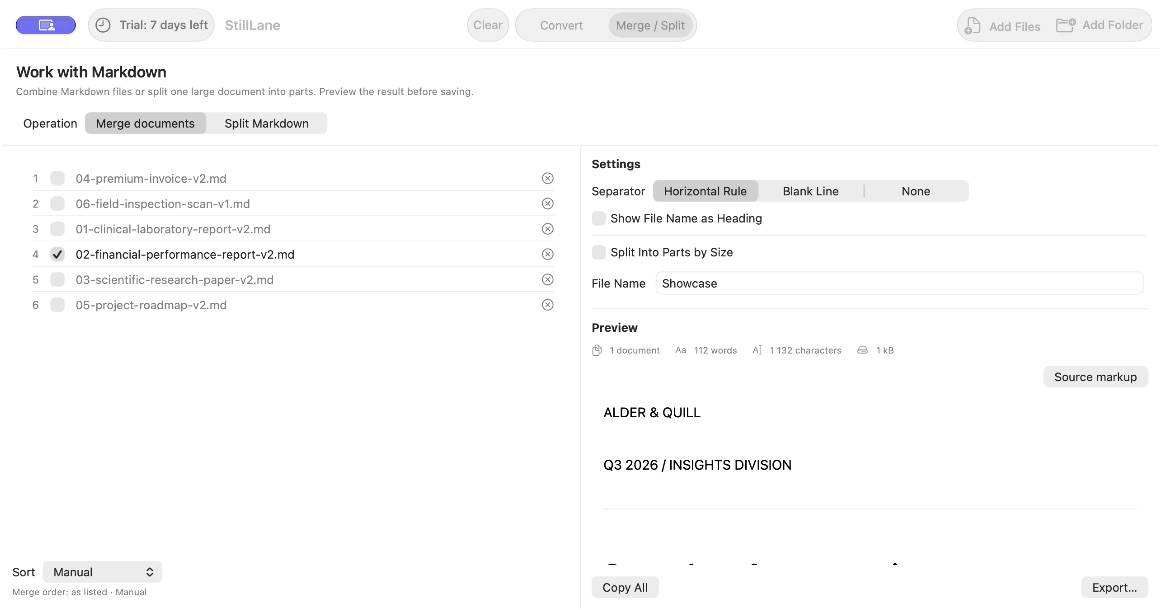
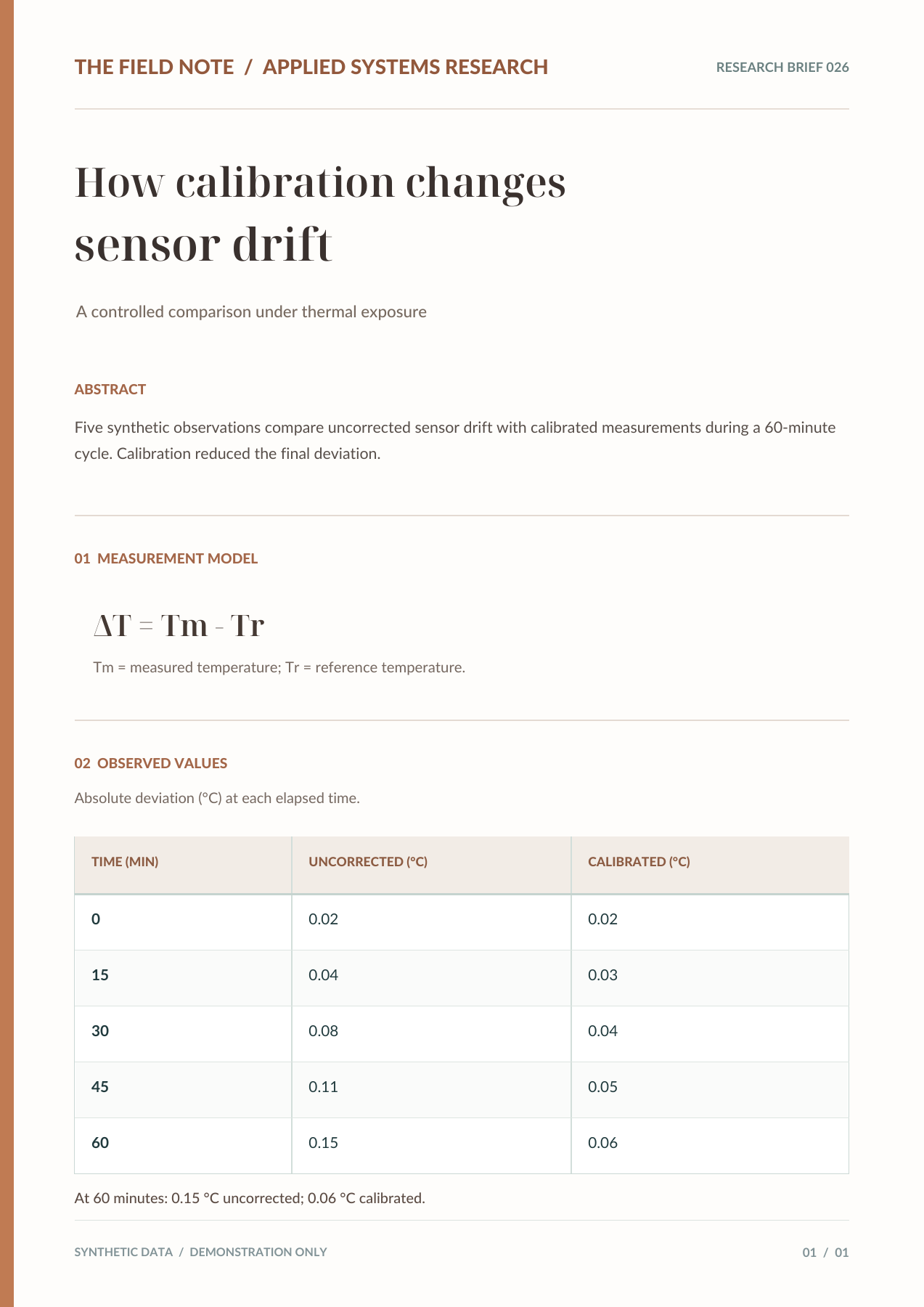
The exported formula stays in LaTeX. The measurement table keeps the two series side by side.
RESEARCH BRIEF 026
A controlled comparison under thermal exposure
Five synthetic observations compare uncorrected sensor drift with calibrated measurements during a 60-minute cycle. Calibration reduced the final deviation.
$$
\Delta T = Tm - Tr
$$
$Tm$ = measured temperature; $Tr$ = reference temperature.
Absolute deviation ( $^\circ$ C) at each elapsed time.
| TIME (MIN) | UNCORRECTED ( $^\circ$ C) | CALIBRATED ( $^\circ$ C) |
|---|---|---|
| 0 | 0.02 | 0.02 |
| 15 | 0.04 | 0.03 |
| 30 | 0.08 | 0.04 |
| 45 | 0.11 | 0.05 |
| 60 | 0.15 | 0.06 |
At 60 minutes: 0.15 $^\circ$ C uncorrected; 0.06 $^\circ$ C calibrated.
SYNTHETIC DATA / DEMONSTRATION ONLY
01 / 01
# THE FIELD NOTE / APPLIED SYSTEMS RESEARCH

RESEARCH BRIEF 026

---

## How calibration changes sensor drift

A controlled comparison under thermal exposure

---

### ABSTRACT

Five synthetic observations compare uncorrected sensor drift with calibrated measurements during a 60-minute cycle. Calibration reduced the final deviation.

---

### 01 MEASUREMENT MODEL

$$
\Delta T = Tm - Tr
$$

$Tm$ = measured temperature; $Tr$ = reference temperature.

---

### 02 OBSERVED VALUES

Absolute deviation ( $^\circ$ C) at each elapsed time.

<table>
  <thead>
    <tr>
      <th>TIME (MIN)</th>
      <th>UNCORRECTED ( $^\circ$ C)</th>
      <th>CALIBRATED ( $^\circ$ C)</th>
    </tr>
  </thead>
  <tbody>
    <tr>
      <td>0</td>
      <td>0.02</td>
      <td>0.02</td>
    </tr>
    <tr>
      <td>15</td>
      <td>0.04</td>
      <td>0.03</td>
    </tr>
    <tr>
      <td>30</td>
      <td>0.08</td>
      <td>0.04</td>
    </tr>
    <tr>
      <td>45</td>
      <td>0.11</td>
      <td>0.05</td>
    </tr>
    <tr>
      <td>60</td>
      <td>0.15</td>
      <td>0.06</td>
    </tr>
  </tbody>
</table>

At 60 minutes: 0.15 $^\circ$ C uncorrected; 0.06 $^\circ$ C calibrated.

---

SYNTHETIC DATA / DEMONSTRATION ONLY

01 / 01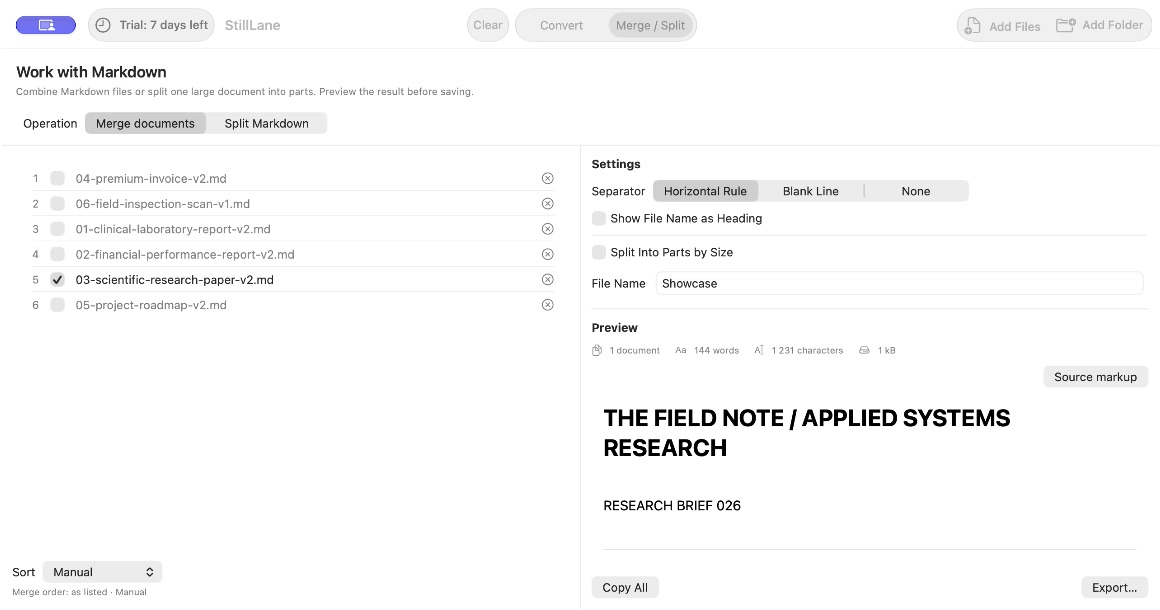
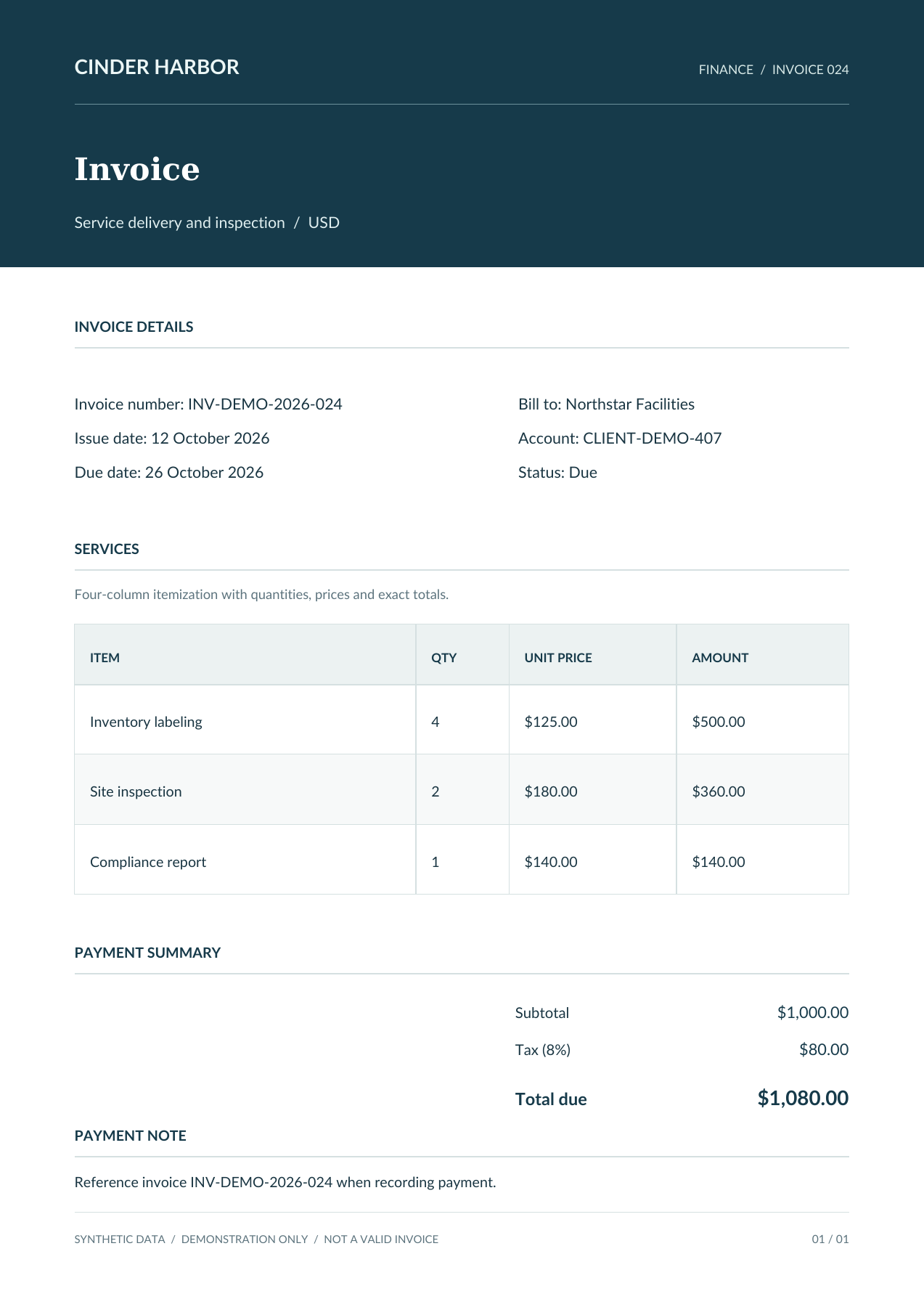
Quantities, prices, subtotal and tax appear in the real exported HTML tables.
FINANCE / INVOICE 024
Service delivery and inspection / USD
Invoice number: INV-DEMO-2026-024
Issue date: 12 October 2026
Due date: 26 October 2026
Bill to: Northstar Facilities
Account: CLIENT-DEMO-407
Status: Due
Four-column itemization with quantities, prices and exact totals.
| ITEM | QTY | UNIT PRICE | AMOUNT |
|---|---|---|---|
| Inventory labeling | 4 | $125.00 | $500.00 |
| Site inspection | 2 | $180.00 | $360.00 |
| Compliance report | 1 | $140.00 | $140.00 |
| Subtotal | $1,000.00 |
| Tax (8%) | $80.00 |
| Total due | $1,080.00 |
Reference invoice INV-DEMO-2026-024 when recording payment.
SYNTHETIC DATA / DEMONSTRATION ONLY / NOT A VALID INVOICE
01 / 01
# CINDER HARBOR

FINANCE / INVOICE 024

---

## Invoice

Service delivery and inspection / USD

---

### INVOICE DETAILS

Invoice number: INV-DEMO-2026-024
Issue date: 12 October 2026
Due date: 26 October 2026

Bill to: Northstar Facilities
Account: CLIENT-DEMO-407
Status: Due

---

### SERVICES

Four-column itemization with quantities, prices and exact totals.

<table>
  <thead>
    <tr>
      <th>ITEM</th>
      <th>QTY</th>
      <th>UNIT PRICE</th>
      <th>AMOUNT</th>
    </tr>
  </thead>
  <tbody>
    <tr>
      <td>Inventory labeling</td>
      <td>4</td>
      <td>$125.00</td>
      <td>$500.00</td>
    </tr>
    <tr>
      <td>Site inspection</td>
      <td>2</td>
      <td>$180.00</td>
      <td>$360.00</td>
    </tr>
    <tr>
      <td>Compliance report</td>
      <td>1</td>
      <td>$140.00</td>
      <td>$140.00</td>
    </tr>
  </tbody>
</table>

---

### PAYMENT SUMMARY

<table>
  <tbody>
    <tr>
      <td>Subtotal</td>
      <td>$1,000.00</td>
    </tr>
    <tr>
      <td>Tax (8%)</td>
      <td>$80.00</td>
    </tr>
    <tr>
      <td>Total due</td>
      <td>$1,080.00</td>
    </tr>
  </tbody>
</table>

---

### PAYMENT NOTE

Reference invoice INV-DEMO-2026-024 when recording payment.

---

SYNTHETIC DATA / DEMONSTRATION ONLY / NOT A VALID INVOICE

01 / 01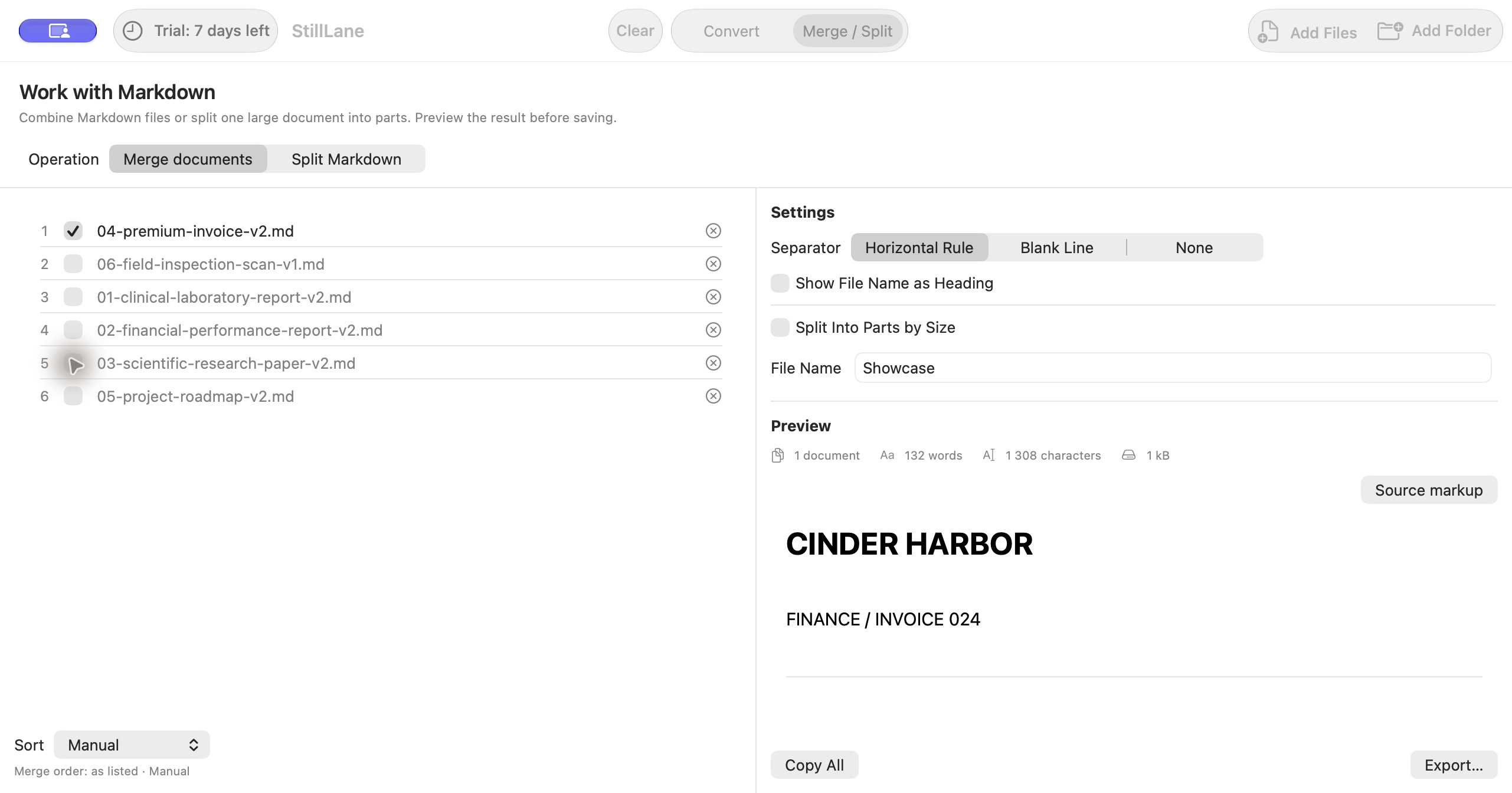
A text-based Gantt uses ON cells. This example does not demonstrate diagram reconstruction.
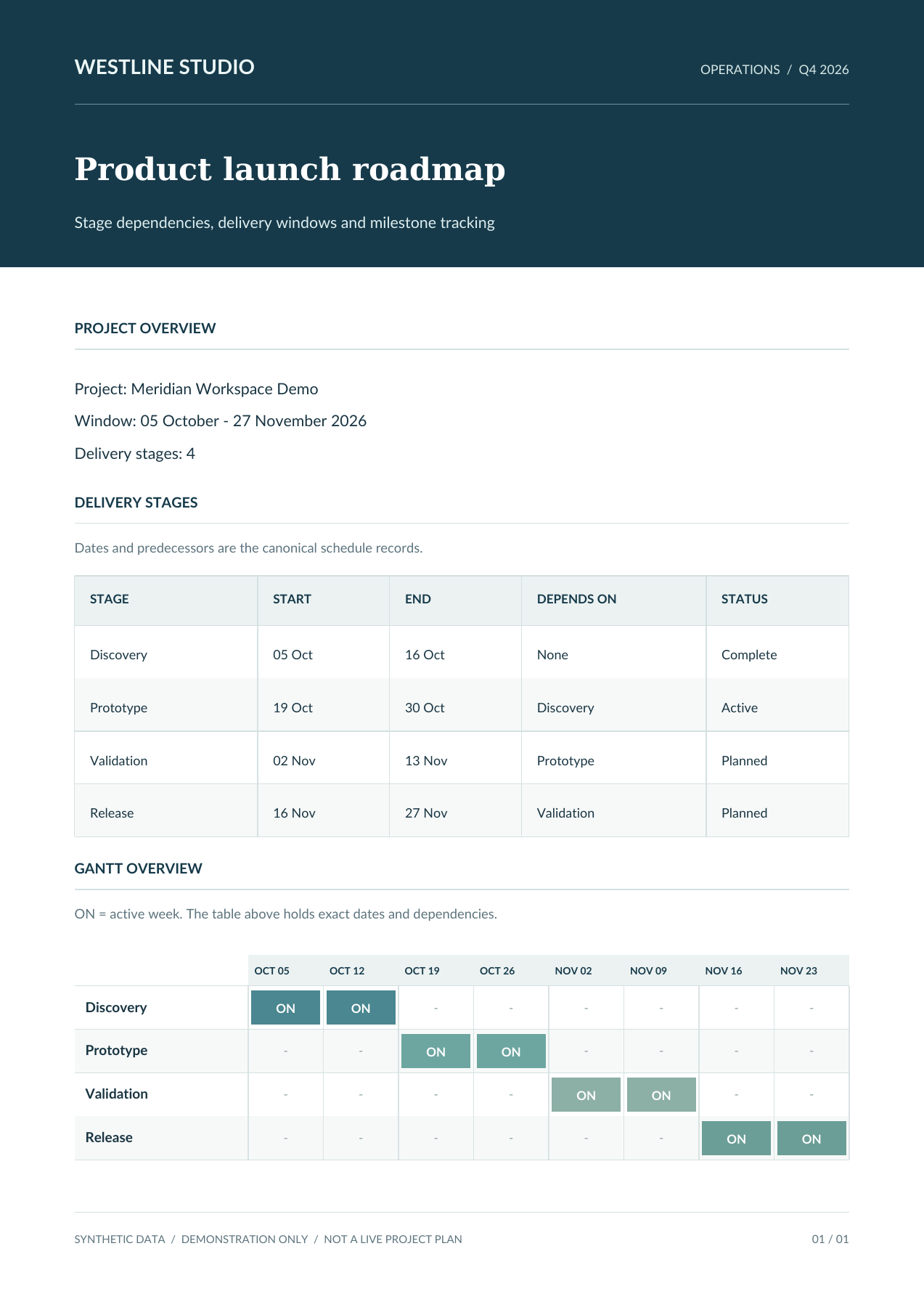
OPERATIONS / Q4 2026
Stage dependencies, delivery windows and milestone tracking
Project: Meridian Workspace Demo
Window: 05 October - 27 November 2026
Delivery stages: 4
Dates and predecessors are the canonical schedule records.
| STAGE | START | END | DEPENDS ON | STATUS |
|---|---|---|---|---|
| Discovery | 05 Oct | 16 Oct | None | Complete |
| Prototype | 19 Oct | 30 Oct | Discovery | Active |
| Validation | 02 Nov | 13 Nov | Prototype | Planned |
| Release | 16 Nov | 27 Nov | Validation | Planned |
ON = active week. The table above holds exact dates and dependencies.
| OCT 05 | OCT 12 | OCT 19 | OCT 26 | NOV 02 | NOV 09 | NOV 16 | NOV 23 | |
|---|---|---|---|---|---|---|---|---|
| Discovery | ON | ON | - | - | - | - | - | - |
| Prototype | - | - | ON | ON | - | - | - | - |
| Validation | - | - | - | - | ON | ON | - | - |
| Release | - | - | - | - | - | - | ON | ON |
SYNTHETIC DATA / DEMONSTRATION ONLY / NOT A LIVE PROJECT PLAN
01 / 01
# WESTLINE STUDIO

OPERATIONS / Q4 2026

---

## Product launch roadmap

Stage dependencies, delivery windows and milestone tracking

---

### PROJECT OVERVIEW

Project: Meridian Workspace Demo
Window: 05 October - 27 November 2026
Delivery stages: 4

---

### DELIVERY STAGES

Dates and predecessors are the canonical schedule records.

<table>
  <thead>
    <tr>
      <th>STAGE</th>
      <th>START</th>
      <th>END</th>
      <th>DEPENDS ON</th>
      <th>STATUS</th>
    </tr>
  </thead>
  <tbody>
    <tr>
      <td>Discovery</td>
      <td>05 Oct</td>
      <td>16 Oct</td>
      <td>None</td>
      <td>Complete</td>
    </tr>
    <tr>
      <td>Prototype</td>
      <td>19 Oct</td>
      <td>30 Oct</td>
      <td>Discovery</td>
      <td>Active</td>
    </tr>
    <tr>
      <td>Validation</td>
      <td>02 Nov</td>
      <td>13 Nov</td>
      <td>Prototype</td>
      <td>Planned</td>
    </tr>
    <tr>
      <td>Release</td>
      <td>16 Nov</td>
      <td>27 Nov</td>
      <td>Validation</td>
      <td>Planned</td>
    </tr>
  </tbody>
</table>

---

### GANTT OVERVIEW

ON = active week. The table above holds exact dates and dependencies.

<table>
  <thead>
    <tr>
      <th rowspan="2"></th>
      <th>OCT 05</th>
      <th>OCT 12</th>
      <th>OCT 19</th>
      <th>OCT 26</th>
      <th>NOV 02</th>
      <th>NOV 09</th>
      <th>NOV 16</th>
      <th>NOV 23</th>
    </tr>
  </thead>
  <tbody>
    <tr>
      <td>Discovery</td>
      <td style="background-color: #6c8b9a;">ON</td>
      <td style="background-color: #6c8b9a;">ON</td>
      <td>-</td>
      <td>-</td>
      <td>-</td>
      <td>-</td>
      <td>-</td>
      <td>-</td>
    </tr>
    <tr>
      <td>Prototype</td>
      <td>-</td>
      <td>-</td>
      <td style="background-color: #6c8b9a;">ON</td>
      <td style="background-color: #6c8b9a;">ON</td>
      <td>-</td>
      <td>-</td>
      <td>-</td>
      <td>-</td>
    </tr>
    <tr>
      <td>Validation</td>
      <td>-</td>
      <td>-</td>
      <td>-</td>
      <td>-</td>
      <td style="background-color: #6c8b9a;">ON</td>
      <td style="background-color: #6c8b9a;">ON</td>
      <td>-</td>
      <td>-</td>
    </tr>
    <tr>
      <td>Release</td>
      <td>-</td>
      <td>-</td>
      <td>-</td>
      <td>-</td>
      <td>-</td>
      <td>-</td>
      <td style="background-color: #6c8b9a;">ON</td>
      <td style="background-color: #6c8b9a;">ON</td>
    </tr>
  </tbody>
</table>

---

SYNTHETIC DATA / DEMONSTRATION ONLY / NOT A LIVE PROJECT PLAN

01 / 01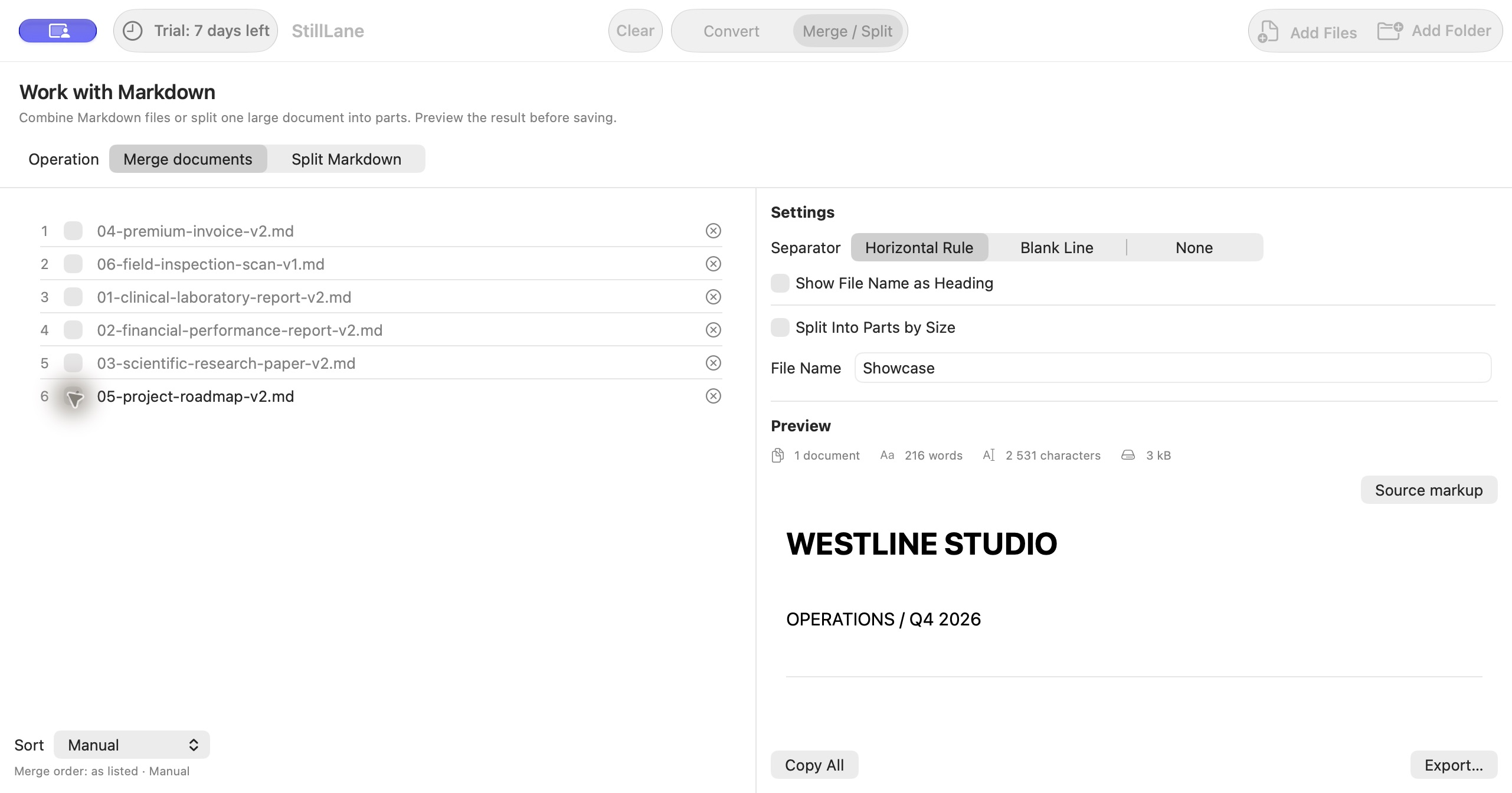
An OCR example with a checklist and follow-up note. Always check recognised text against the scan.
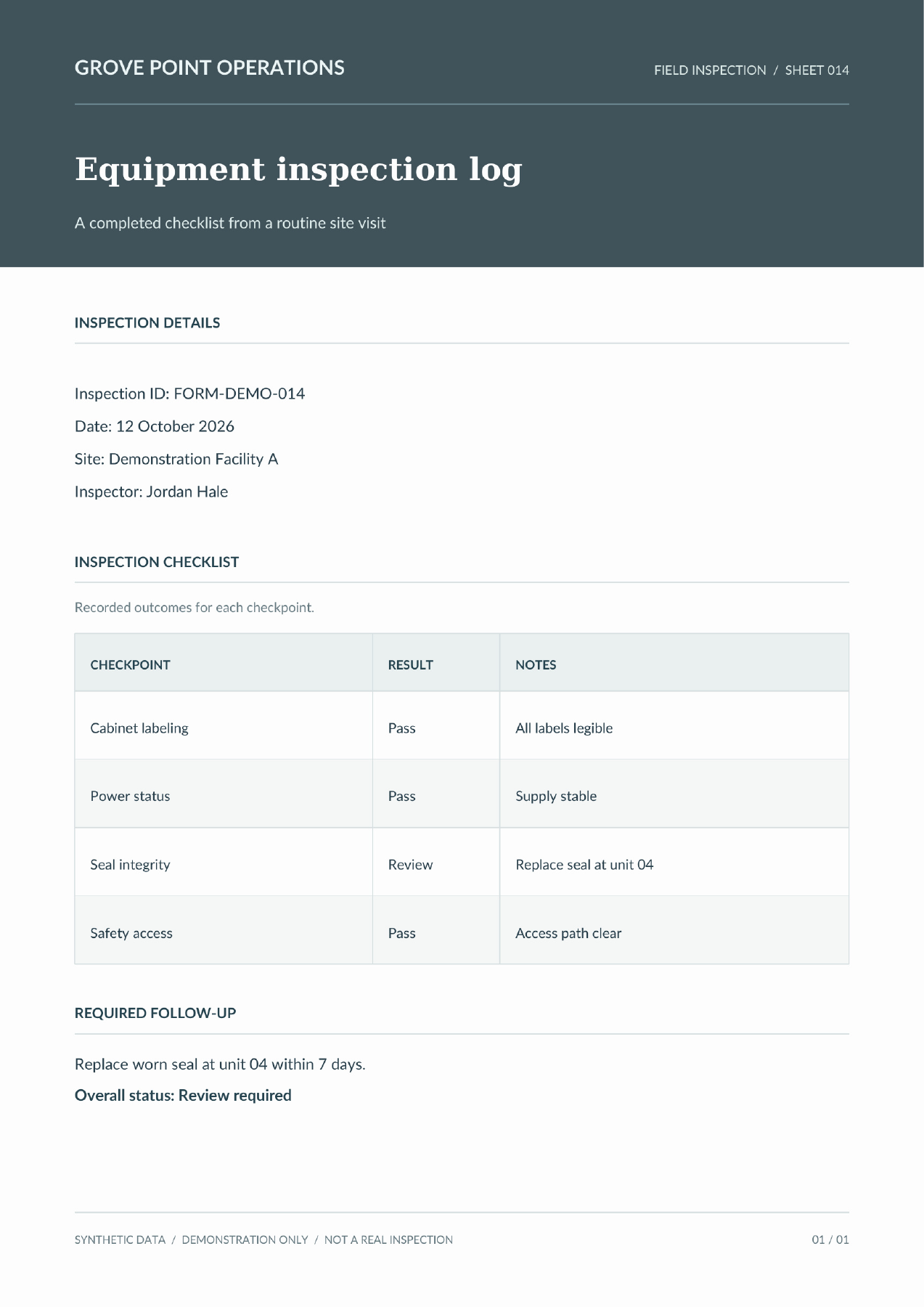
FIELD INSPECTION / SHEET 014
A completed checklist from a routine site visit
Inspection ID: FORM-DEMO-014
Date: 12 October 2026
Site: Demonstration Facility A
Inspector: Jordan Hale
Recorded outcomes for each checkpoint.
| CHECKPOINT | RESULT | NOTES |
|---|---|---|
| Cabinet labeling | Pass | All labels legible |
| Power status | Pass | Supply stable |
| Seal integrity | Review | Replace seal at unit 04 |
| Safety access | Pass | Access path clear |
Replace worn seal at unit 04 within 7 days.
Overall status: Review required
SYNTHETIC DATA / DEMONSTRATION ONLY / NOT A REAL INSPECTION
01 / 01
# GROVE POINT OPERATIONS

FIELD INSPECTION / SHEET 014

---

## Equipment inspection log

A completed checklist from a routine site visit

---

### INSPECTION DETAILS

Inspection ID: FORM-DEMO-014
Date: 12 October 2026
Site: Demonstration Facility A
Inspector: Jordan Hale

---

### INSPECTION CHECKLIST

Recorded outcomes for each checkpoint.

<table>
  <thead>
    <tr>
      <th>CHECKPOINT</th>
      <th>RESULT</th>
      <th>NOTES</th>
    </tr>
  </thead>
  <tbody>
    <tr>
      <td>Cabinet labeling</td>
      <td>Pass</td>
      <td>All labels legible</td>
    </tr>
    <tr>
      <td>Power status</td>
      <td>Pass</td>
      <td>Supply stable</td>
    </tr>
    <tr>
      <td>Seal integrity</td>
      <td>Review</td>
      <td>Replace seal at unit 04</td>
    </tr>
    <tr>
      <td>Safety access</td>
      <td>Pass</td>
      <td>Access path clear</td>
    </tr>
  </tbody>
</table>

---

### REQUIRED FOLLOW-UP

Replace worn seal at unit 04 within 7 days.
**Overall status: Review required**

---

SYNTHETIC DATA / DEMONSTRATION ONLY / NOT A REAL INSPECTION

01 / 01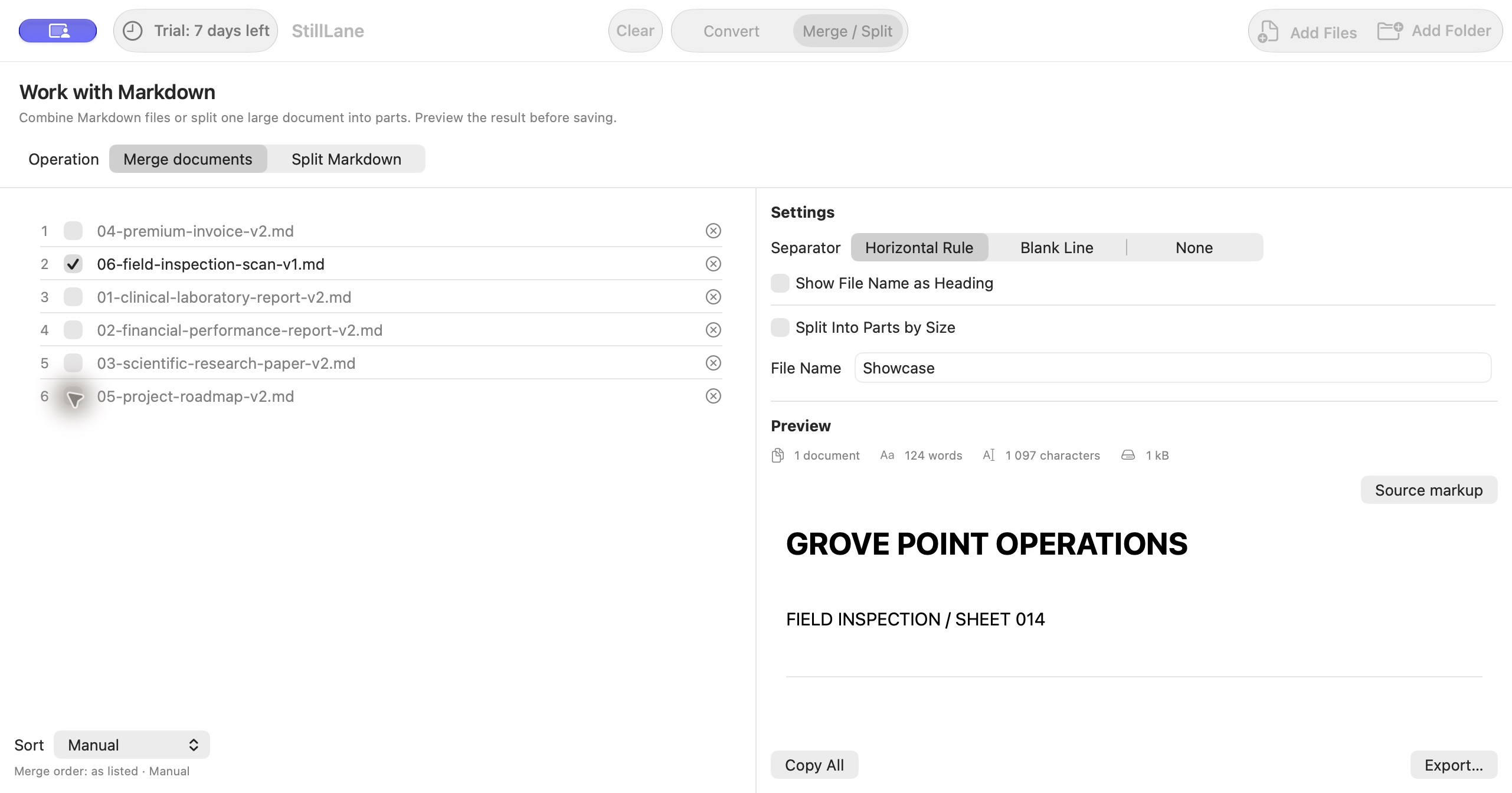
Synthetic demonstration documents. The exports are unchanged, including HTML tables. Math is shown as LaTeX source. OCR results need checking.
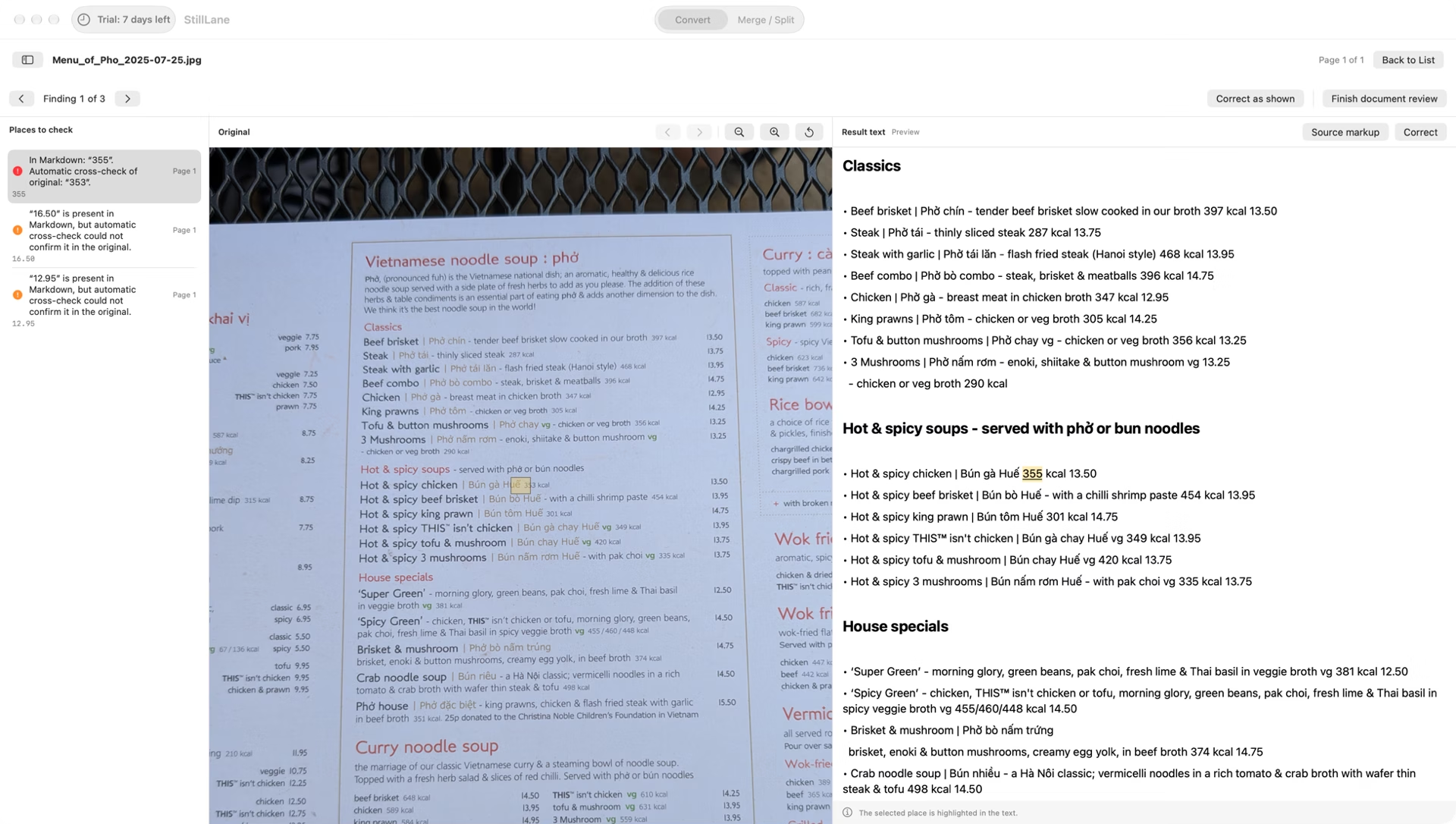
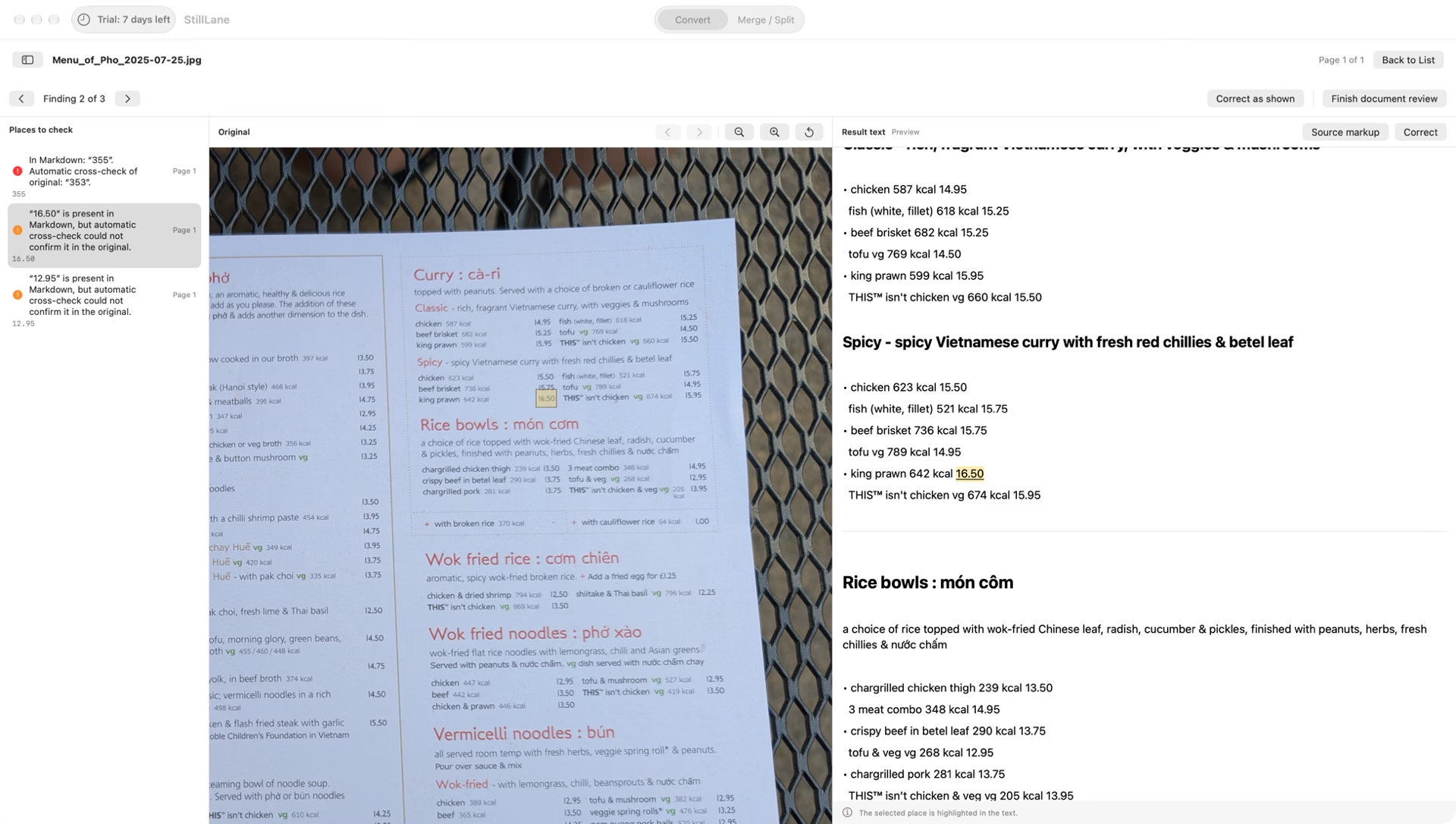
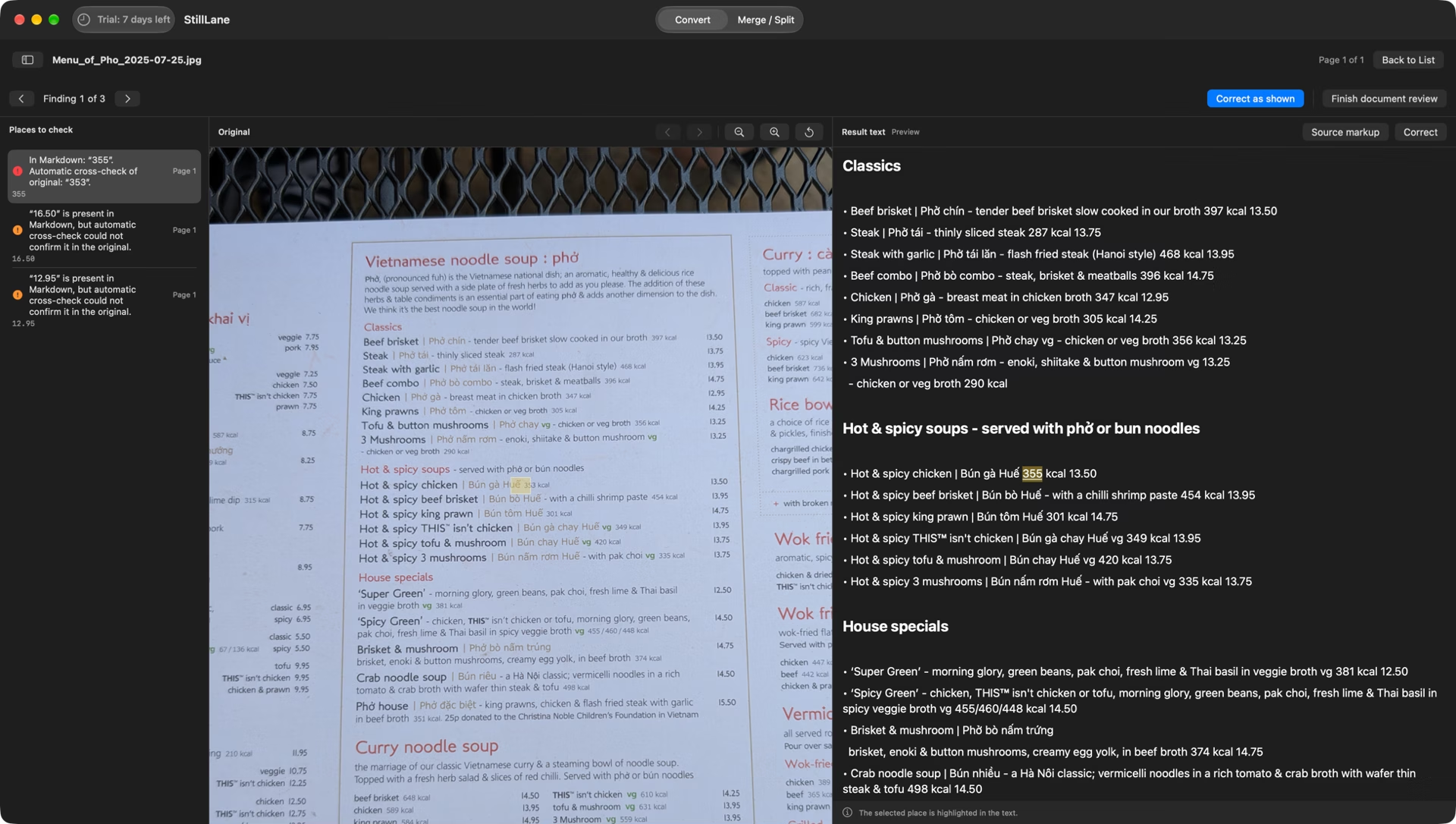
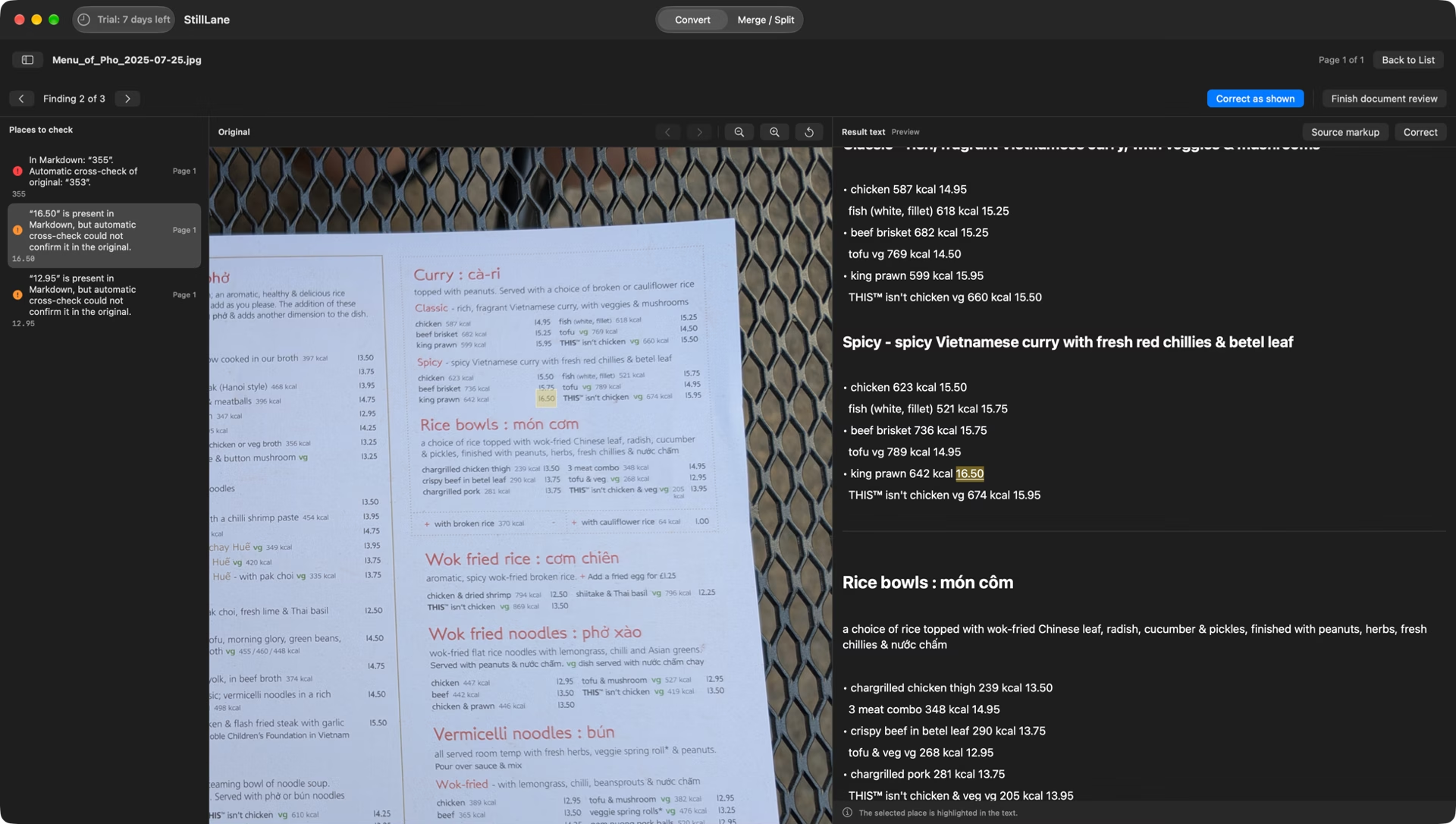
A real menu photo, converted by StillLane on a Mac. Recognition is compared with an independent check, and every place to verify is shown next to the original.
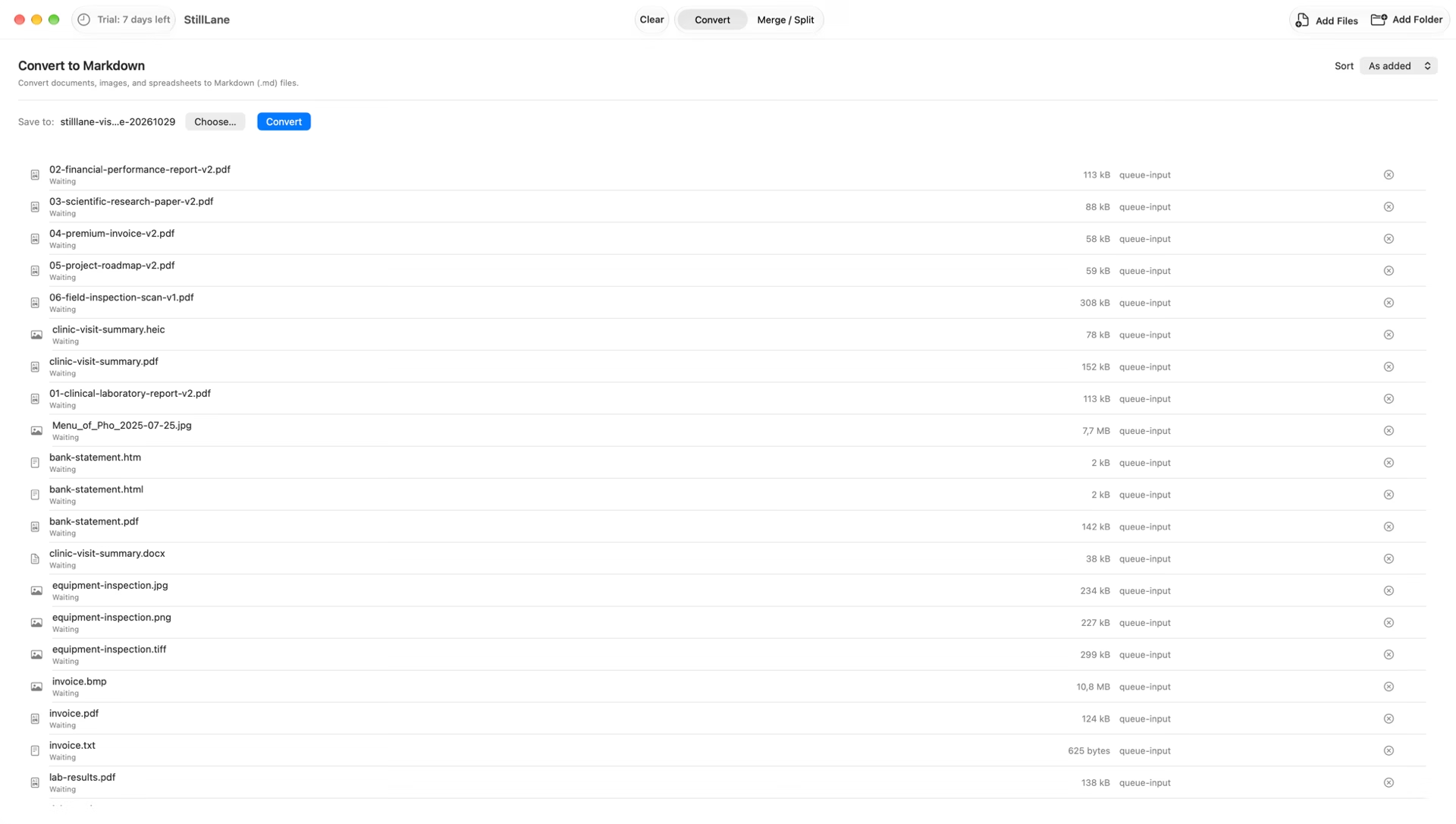
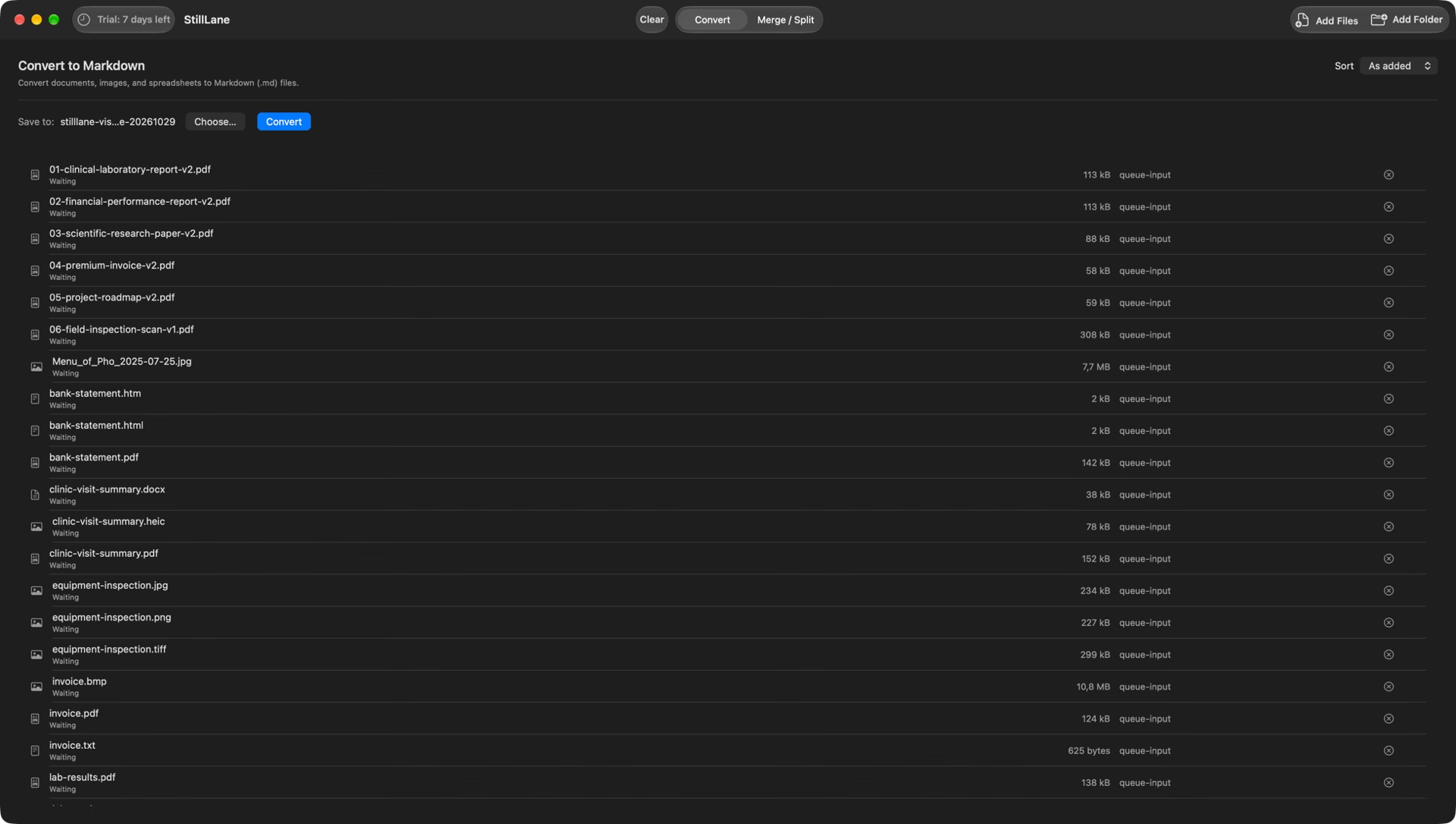
Convert a document, check the result, then organise your Markdown.
Drag documents or a whole folder from Finder, or choose them in the app.
Each file becomes its own Markdown file. Tables stay tables.
Recognition is not perfect, especially for handwriting and poor scans. Values StillLane is unsure about are marked; compare the result with the original and edit the Markdown.
Join Markdown files in the order you choose, or split a long one into parts of the size you set.
The terms of sale and the license agreement will be published before sales open.
A personal license for one person.
Use it on up to 5 Macs you own or mainly use. StillLane does not count Macs and does not ask you to deactivate one.
All StillLane 1.x updates are included. Terms for a future major version have not been set.
No account and no online activation — the license is checked on your Mac.
Questions? Visit StillLane Support.
Creating new results — converting, merging and splitting — needs a license. Documents you have already created still open, and you can keep editing them.
No. Conversion and the license check both work offline.
In StillLane, choose StillLane › Enter License…, then paste the key or choose Open File… to open the license file. More help.
No tool reads every scan perfectly. StillLane marks the places it is unsure about; check important numbers against the original before you rely on them.